Bash + rclone · OneDrive ↔ Google Drive · Open-source operations guide

A Copy-Only Cloud Transfer in Bash with rclone

rclone already understands cloud pagination, retries, resumable transfers, and provider hashes. The engineering task is to wrap those primitives in a fail-closed, capacity-aware operating procedure.

Updated ; 20 minute read.

Short answer

FileArk is the simpler managed choice for large or unattended migrations: it runs the transfer online, has been tested against multi-terabyte workloads, and checks each result before completion. For operators who want a shell-controlled data path, this MIT-licensed Bash wrapper copies bounded batches through local staging, verifies both legs byte-for-byte, and never deletes source files.

Why wrap rclone instead of rebuilding every provider client

rclone gives a shell workflow a mature provider abstraction, OAuth configuration, pagination, retry behavior, resumable transfers, concurrency controls, inventory commands, and verification commands. The wrapper can therefore concentrate on migration invariants: copy-only verbs, bounded staging, capacity reserves, deterministic file lists, and durable progress.

That does not make the job automatic. The operator still owns remote configuration, token security, network uptime, process supervision, local disk, logs, provider limits, failed-object review, and destination acceptance. FileArk exists for users who want that procedure operated as a managed online workflow rather than on their workstation or server.

The script explicitly never invokes rclone move, sync, delete, purge, or rmdirs. It uses lsf and about for discovery, copy for each leg, and check --download for full-byte verification. The only removal is a verified file from the local staging directory.

Download the Bash edition and MIT license

Download the Bash and rclone transfer program
A copy-only wrapper with batch limits, local and destination reserves, full-byte verification, checkpoints, retry controls, and a network-free demo.
fileark-cloud-transfer.sh · Bash 4+ · rclone · jq · MIT license

Download the MIT license
Permission notice covering both FileArk manual-transfer scripts.
LICENSE-fileark-cloud-transfer.txt · MIT · plain text

Run the network-free operator demo
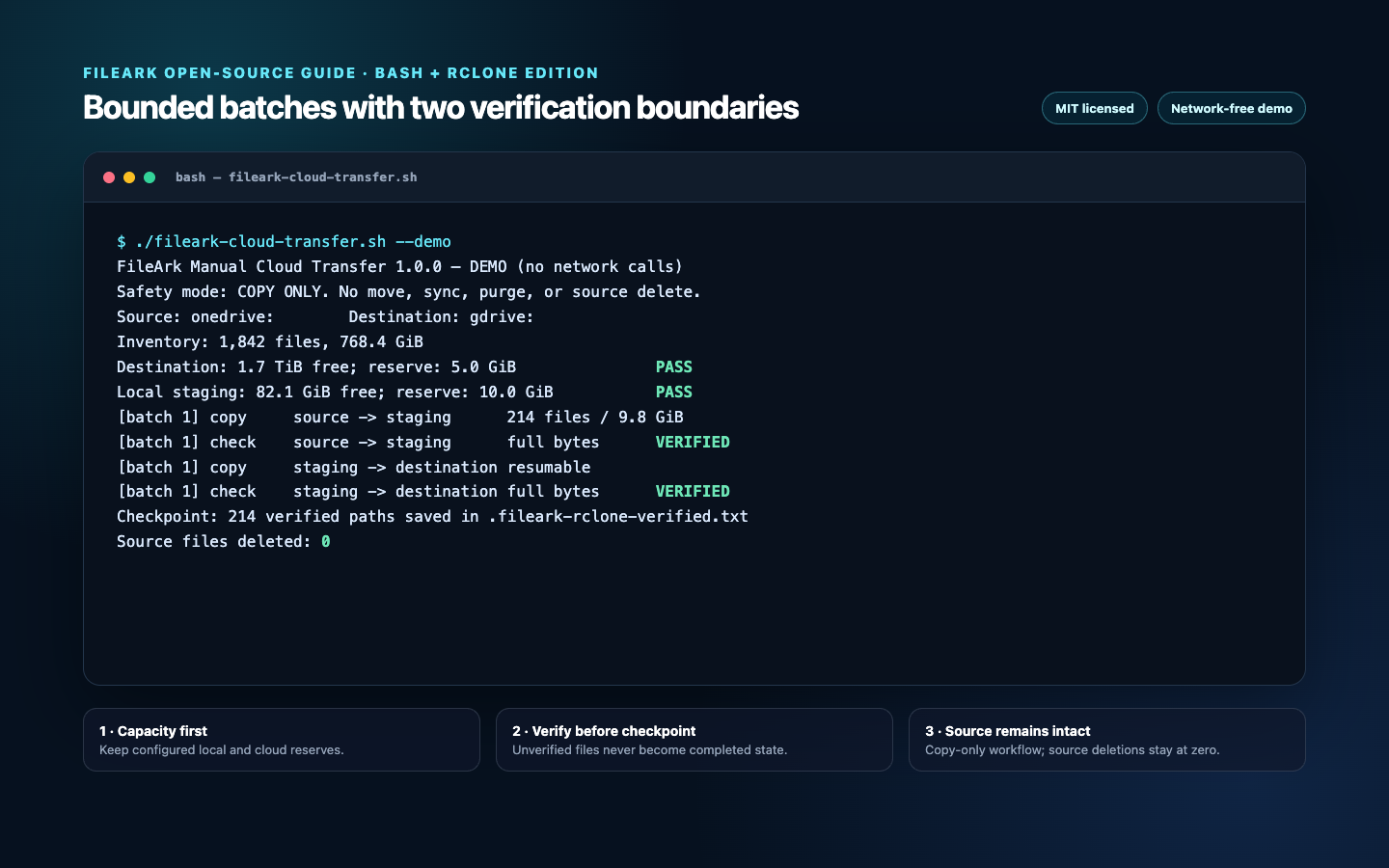
Terminal running the FileArk Bash and rclone cloud transfer script in demo mode
The demo shows one bounded batch crossing both verification boundaries. It does not inspect rclone configuration, contact a cloud, or write remote data.

The demo is safe to run before rclone or jq is installed because argument parsing exits before dependency checks. The output names the prohibited destructive operations, shows both capacity reserves, and ends with the source deletion count.

Inspect and smoke-test the download
chmod +x fileark-cloud-transfer.sh
bash -n fileark-cloud-transfer.sh
./fileark-cloud-transfer.sh --demo
./fileark-cloud-transfer.sh --help

Install and configure the operator dependencies

Install a current rclone release using its official instructions and install jq from your operating system package manager. Bash 4 or newer is required because the wrapper uses strict error handling and modern conditional expressions.

Run rclone config and create two independently named remotes, for example onedrive: and gdrive:. Enter your own provider client ID and secret when policy or rate limits require dedicated OAuth applications. rclone stores OAuth tokens in its configuration file; protect that file with restrictive permissions and never bundle it with the script.

Confirm each remote with a read-only listing and quota command before running the wrapper. Use paths such as onedrive:Department/Archive when only a subtree is in scope.

Configure and inspect both remotes
rclone version
rclone config
rclone lsd onedrive:
rclone lsd gdrive:
rclone about onedrive: --json | jq
rclone about gdrive: --json | jq

Freeze a deterministic inventory before moving bytes

The wrapper uses rclone lsf recursively with an explicit tab separator and the sp format, producing size followed by path. It validates that each size is numeric and each path is relative, then excludes paths already present in the verified checkpoint.

The Bash edition rejects filenames containing tabs, carriage returns, or newlines because newline-delimited --files-from-raw lists cannot represent them without ambiguity. Use the Python edition or a purpose-built inventory format when those names exist.

A path checkpoint is intentionally simple and inspectable. It assumes source paths remain stable during the run. Freeze writes to the source if possible, or regenerate and reconcile inventory when concurrent changes are expected.

Inventory primitive used by the wrapper
rclone lsf "$SOURCE" \
  --recursive \
  --files-only \
  --format "sp" \
  --separator 


\t' > "$inventory"

Fail before a batch consumes the reserve

Local free bytes come from df on the staging filesystem. Destination free bytes come from rclone about --json: the script uses free when supplied, otherwise total minus used. It checks total pending bytes before work and checks both local and destination capacity again before every batch.

Some providers or account types do not publish a finite quota through rclone. The wrapper prints that limitation and continues under provider enforcement. Treat that as a monitoring requirement, not proof of adequate space.

The batch limit is not a hard maximum for one object. A single file larger than the configured batch can form its own batch, so local free space must cover the largest file plus reserve. Full destination verification reads bytes from the destination but does not keep a second local copy in the rclone edition.

Verify each side of the local staging boundary

Each batch crosses two independent legs. First, rclone copies the selected source paths into local staging with --ignore-existing, then check --download reads both sides and compares actual content. Second, rclone copies those staged paths into the destination and repeats the same full-byte check.

--ignore-existing makes interrupted runs non-destructive: an existing object is not overwritten. Verification must still pass before the path can be checkpointed. If the existing destination differs, rclone check fails and strict Bash error handling stops the run.

Using --download is slower and consumes provider egress/read operations, but it avoids depending only on whether two providers expose a common hash algorithm. The command does not modify either side.

The two copy and verification legs
rclone copy "$SOURCE" "$STAGING_DIR" \
  --files-from-raw "$batch_list" \
  --ignore-existing --retries 6 --low-level-retries 20

rclone check "$SOURCE" "$STAGING_DIR" \
  --files-from-raw "$batch_list" --one-way --download

rclone copy "$STAGING_DIR" "$DESTINATION_ROOT" \
  --files-from-raw "$batch_list" \
  --ignore-existing --retries 6 --low-level-retries 20

rclone check "$STAGING_DIR" "$DESTINATION_ROOT" \
  --files-from-raw "$batch_list" --one-way --download

Run OneDrive to Google Drive with bounded staging

The example keeps 15 GiB of local disk untouched, keeps 10 GiB free at Google Drive, caps a normal batch at 8 GiB or 200 files, and uses four concurrent transfers. Destination content is written under a new dated folder.

Use --dry-run first. It performs source inventory and destination quota preflight without downloading or uploading. The wrapper prints all pending bytes, which should be reconciled with your migration scope before the first real batch.

Preflight, then execute the same scope
./fileark-cloud-transfer.sh \
  --source onedrive: \
  --destination gdrive: \
  --destination-folder "OneDrive archive 2026-07-25" \
  --staging-dir /srv/fileark-staging \
  --state-file ./onedrive-to-google-verified.txt \
  --batch-gib 8 \
  --batch-files 200 \
  --local-reserve-gib 15 \
  --destination-reserve-gib 10 \
  --transfers 4 \
  --checkers 8 \
  --dry-run

# Remove only --dry-run after reviewing the preflight.

Reverse the direction without reusing state

The wrapper is provider-neutral because rclone owns the remote adapters. Exchange the remote arguments to copy Google Drive into OneDrive, and give that run a new destination folder, staging path, and checkpoint file.

Google-native Docs, Sheets, Slides, and other virtual formats require rclone export configuration and careful review. Confirm the exported extensions and conversion behavior with a test set. A shell copy does not preserve Google collaboration history, shortcuts, permissions, or Microsoft-specific metadata.

Google Drive to OneDrive
./fileark-cloud-transfer.sh \
  --source gdrive: \
  --destination onedrive: \
  --destination-folder "Google archive 2026-07-25" \
  --staging-dir /srv/google-staging \
  --state-file ./google-to-onedrive-verified.txt \
  --batch-gib 8 \
  --local-reserve-gib 15

Checkpoint only after destination verification

After the destination check exits successfully, the wrapper appends each relative path to a plain-text checkpoint. It then deletes that file from local staging and removes empty local directories. The source remote remains untouched.

The checkpoint is append-only during a run and easy to audit with standard tools. Preserve it with the command line, rclone version, configuration fingerprint, inventory, logs, timestamps, and acceptance notes. Do not edit it to suppress a failure unless the destination file was independently verified.

A plain path checkpoint cannot detect a source object whose content changes without a path change. For mutable datasets, quiesce writes, capture provider IDs and modification metadata separately, or use the Python edition's stricter ID-and-size checkpoint. For regulated or collaborative migrations, use a managed workflow with explicit change control.

Treat every non-zero exit as an unresolved batch

  • Strict mode exits when a command, pipeline, or unset variable fails; the temporary inventory directory is removed automatically.
  • rclone retries transient transfers, but persistent permission, quota, network, conflict, or integrity errors stop the batch.
  • Uncheckpointed staged files remain available for inspection and an identical rerun uses --ignore-existing before checking their bytes.
  • A differing destination file is never overwritten. Resolve the conflict or choose a clean destination root.
  • Do not convert a failed copy into rclone sync or move. Those commands have different deletion semantics.
  • Keep logs and the checkpoint until manual destination acceptance is complete.

Secure the host that becomes the data plane

The staging host temporarily contains readable copies of source data and OAuth refresh tokens. Use full-disk encryption, restrictive file permissions, a dedicated operating-system account, patched dependencies, controlled administrator access, and an encrypted backup policy that does not unexpectedly retain staging content.

Avoid command-line secrets because process lists and shell history can expose them. rclone's protected configuration can obscure tokens at rest, but it is not a substitute for host security. Remove token material and staging remnants after migration acceptance according to your retention policy.

Monitor provider audit logs, network egress, disk health, inode availability, process status, and rclone output. A terminal left open is not process supervision; use an approved service manager or terminal multiplexer and make logs durable.

Close the migration with evidence, not a green command

  • Archive the frozen inventory, exact command, script checksum, rclone version, remote configuration fingerprint, and verified checkpoint.
  • Reconcile file counts and known bytes by folder, not only at the drive total.
  • Open a risk-based sample of large, small, old, new, Unicode, deeply nested, archived, and converted documents.
  • Test destination access from representative user accounts and recreate required sharing separately.
  • Review skipped packages, shortcuts, links, native documents, conflicts, and provider warnings.
  • Keep a source overlap period and obtain explicit owner acceptance before any later retention or deletion decision.

Frequently asked questions

Why does the Bash script use rclone copy rather than sync?

Copy does not delete source objects or remove destination objects that are absent from the source. Sync has different reconciliation and deletion semantics, so it is intentionally outside this workflow.

Does rclone check --download change either cloud?

No. It reads and compares file content. The script uses it after each copy leg so a path is checkpointed only after destination bytes match staged bytes.

What happens when the destination already contains a file?

The copy uses --ignore-existing, then full-byte verification. An identical object can pass; a different object causes the check to fail. The script never overwrites the conflict.

Can the script handle files larger than one batch?

Yes. One oversized file becomes its own batch. The staging filesystem must have room for that file plus the configured local reserve.

Does this migrate permissions, versions, or cloud-native collaboration data?

No. It copies file content and paths through rclone. Access control, versions, labels, comments, shortcuts, links, retention rules, and provider-native behavior require separate planning and verification.

Official resources used for this guide

Read guide