Python · Google Drive ↔ OneDrive · Open-source engineering guide
Build a Safe Google Drive–OneDrive Transfer in Python
This guide turns a deceptively difficult cloud copy into an explicit pipeline: enumerate, preflight, stage, hash, upload, re-download, compare, checkpoint, and only then release local disk space.
Updated ; 22 minute read.
Short answer
For a managed migration, FileArk automates this workflow without making your computer the data plane. It has been tested with multi-terabyte migration workloads and checks source receipt, provider upload acceptance, and the destination object before reporting success. If you need to operate the pipeline yourself, the MIT-licensed Python program below performs a conservative copy through your machine and never deletes source files.
Choose the operating model before choosing the code
A direct cloud migration service is the practical choice when the library is large, the connection must run unattended, or a laptop should not carry the data. FileArk keeps the transfer online, monitors provider responses, retries recoverable failures, and gives you one progress view. Its validation path performs three independent checks before a file is treated as complete.
A local script is useful when you need full control over OAuth applications, staging disks, logs, or destination folder policy. The tradeoff is operational responsibility: your machine must remain online, its network connection becomes the bottleneck, OAuth credentials must be protected, and enough temporary disk space must remain available for the active batch and verification copy.
The program released here is intentionally conservative. It copies from one personal drive root into a new destination folder. It does not expose a delete method, does not overwrite conflicts, saves a durable checkpoint after verification, and stops when either local or destination capacity falls below your configured reserve.
The transfer pipeline and its failure boundaries
Inventory the source tree
The source adapter walks folders recursively, follows provider pagination, records IDs, paths, types, and reported sizes, and maps supported Google-native files to portable export formats.
Preflight destination and local capacity
The engine compares pending bytes plus a configurable reserve with destination quota. It also checks the staging filesystem before every batch and every individual download.
Stage a bounded batch
Files are processed in batches constrained by both total bytes and file count. Only the current batch uses local disk, so a large library does not require a same-sized drive.
Hash and upload
After downloading, the script computes local SHA-256, checks any known source size, creates destination folders, and uploads in provider-compatible resumable chunks.
Verify and checkpoint
The default mode re-downloads the new destination object and compares SHA-256. Only a matching file is written to the JSON checkpoint and removed from local staging.
Download the complete MIT-licensed Python edition
The download is a single readable Python entry point. Provider SDKs are imported only for a real transfer, so the demo and help commands run before dependencies or credentials are installed. A separate requirements file pins minimum supported packages, and the license is supplied beside the source.
Read the code before using it, test with a small destination folder, and keep the default re-download verification for valuable data. No generic script can reproduce every sharing permission, shortcut, retention label, shared-drive rule, or tenant policy.
Download the Python transfer program
Direct Google Drive API and Microsoft Graph implementation with batching, checkpoints, retries, quota reserves, and destination SHA-256 verification.fileark-cloud-transfer.py · Python 3.10+ · MIT license
Download the Python requirements
Small dependency list for Google OAuth and Drive, Microsoft authentication, Graph requests, and retry support.requirements-fileark-cloud-transfer.txt · pip requirements · plain text
Download the MIT license
Permission notice covering both FileArk manual-transfer scripts.LICENSE-fileark-cloud-transfer.txt · MIT · plain text
See the safety path before granting cloud access
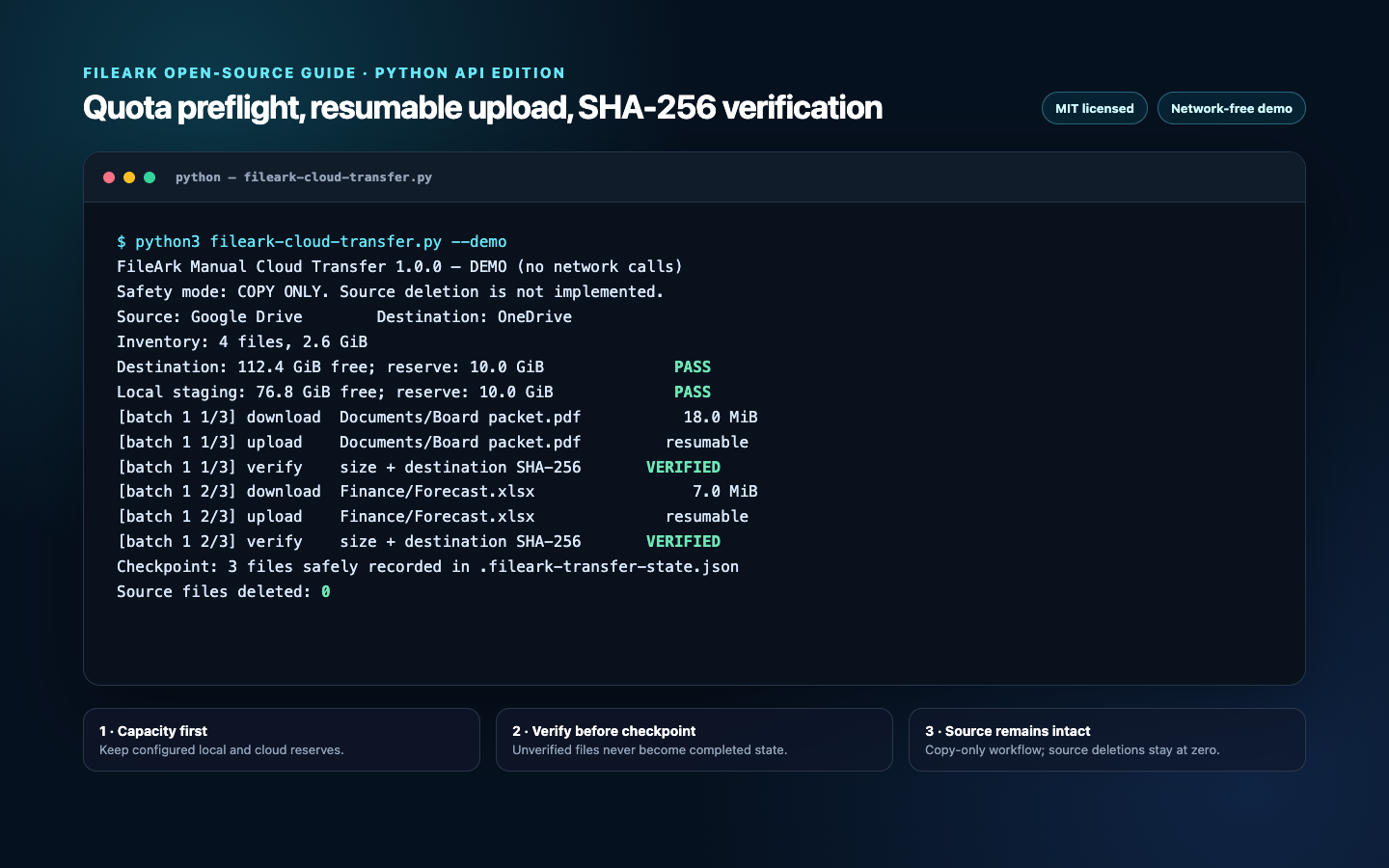
Run the demo first. It makes no network calls and writes no cloud data. The final line is deliberately unambiguous: zero source files were deleted. The real engine emits the same sequence through structured logs and exits non-zero on the first unverified file.
chmod +x fileark-cloud-transfer.py
python3 fileark-cloud-transfer.py --demo
python3 fileark-cloud-transfer.py --help
Create OAuth clients without embedding secrets
For Google Drive, create a desktop OAuth client in a Google Cloud project, enable the Drive API, configure the consent screen, and download the client JSON. Pass its path with --google-client-secret or set GOOGLE_OAUTH_CLIENT_SECRET_FILE. The script requests Drive access because it must list, download, create folders, upload, and verify files.
For OneDrive, register a public client application in Microsoft Entra ID, enable the device-code flow, add delegated Files.ReadWrite permission, and pass the application client ID. Choose common for consumer and organizational accounts, organizations for work accounts, or a specific tenant ID when policy requires it.
Tokens are cached in local files so an interrupted migration can resume without a fresh login. Treat the client JSON and token caches as secrets: exclude them from version control, limit filesystem permissions, never upload them to support tickets, and remove them when the migration is accepted.
python3 -m venv .venv
. .venv/bin/activate
python -m pip install --upgrade pip
python -m pip install -r requirements-fileark-cloud-transfer.txt
Run Google Drive to OneDrive—or reverse it
All identity-specific values belong to the operator. The program ships with no client ID, secret, tenant, token, remote account, or destination credential. The first command signs in to Google in a browser and Microsoft with a device code, then copies into a new OneDrive folder.
Reverse source and destination to run OneDrive to Google Drive. Use a different state file and destination root for every independent migration. The checkpoint binds source provider, destination provider, and root together and refuses to resume with a mismatched configuration.
export MICROSOFT_CLIENT_ID="your-public-client-id"
python fileark-cloud-transfer.py \
  --source google \
  --destination onedrive \
  --google-client-secret ./client_secret.json \
  --microsoft-tenant common \
  --destination-root "FileArk Manual Transfer 2026-07-25" \
  --batch-gib 8 \
  --batch-files 200 \
  --local-reserve-gib 15 \
  --destination-reserve-gib 10 \
--verification redownloadpython fileark-cloud-transfer.py \
--source onedrive \
--destination google \
--microsoft-client-id "$MICROSOFT_CLIENT_ID" \
--google-client-secret ./client_secret.json \
--destination-root "OneDrive archive 2026-07-25" \
--state-file ./onedrive-to-google-state.json \
--verification redownloadWhy capacity is checked more than once
A single preflight can become stale while a long transfer runs. Someone can upload other files to the destination, an exported Google document can be larger than its source metadata suggests, and unrelated applications can consume local disk. The engine therefore checks aggregate destination capacity before starting, destination capacity at every batch, destination capacity again after each local download, and local disk before each stage or verification copy.
The reserve values are operational headroom, not estimates of transfer size. Keep them large enough for operating-system updates, provider accounting delay, and other users of the same cloud quota. When a provider does not expose a finite remaining quota, the script warns and relies on provider enforcement; that is weaker than a known preflight and deserves active monitoring.
def ensure_destination_capacity(quota, required, reserve):
    if quota.remaining is None:
        LOG.warning("Destination did not report a finite quota")
        return
    needed = required + reserve
    if quota.remaining < needed:
        raise RuntimeError(
            f"Destination is too small: {human_bytes(quota.remaining)} free, "
            f"{human_bytes(needed)} required including reserve."
        )
Bound the staging footprint by bytes and count
A byte ceiling controls disk exposure; a file-count ceiling controls API and filesystem overhead when the source contains hundreds of thousands of tiny objects. A file larger than the batch ceiling is allowed as a one-file batch, so the reserve must be sized for the largest individual object.
The default chunk is 10 MiB. That is a common multiple of Google Drive's 256 KiB resumable-upload granularity and Microsoft Graph's 320 KiB sequential-fragment requirement. The command-line validator rejects incompatible chunk sizes before authentication.
def batches(files, max_bytes, max_files):
    batch, batch_size = [], 0
    for item in files:
        planned_size = max(item.size, 1)
        if batch and (
            len(batch) >= max_files
            or batch_size + planned_size > max_bytes
        ):
            yield batch
            batch, batch_size = [], 0
        batch.append(item)
        batch_size += planned_size
    if batch:
        yield batch
Handle Google-native documents as conversions
Google Docs, Sheets, Slides, Drawings, and Apps Script projects are not ordinary downloadable byte streams. The Google adapter exports them to DOCX, XLSX, PPTX, PNG, and JSON respectively, adding a portable filename extension. Folders are traversed but not uploaded as empty objects unless they contain a file.
Conversion can change fonts, formulas, comments, embedded objects, page layout, and collaborative history. Google export endpoints also impose format and size constraints. The script skips unsupported native types with a warning rather than inventing a representation. Review representative converted files manually.
Shortcuts, shared drives, files shared with you but not located in My Drive, OneNote packages, organization retention metadata, version history, and sharing ACLs are outside this edition. These boundaries are why a file copy should not be described as a complete tenant migration.
Use full destination re-download verification for exact bytes
Provider upload success is necessary but not sufficient. After upload, the script first compares destination metadata size with the staged file. In the default redownload mode it then downloads the destination object into a temporary sibling file, computes SHA-256, and compares that digest with the staged source digest.
Only a size match and digest match produce a checkpoint entry. The checkpoint records source ID, source-reported size, destination ID, destination path, actual bytes, both digests, and UTC completion time. If a checkpointed source path later points to a different ID or size, the script stops rather than silently skipping changed data.
Redownloading doubles destination-side read traffic and temporarily requires space for both the staged file and verification copy. Select metadata mode only when that cost is understood and an independent content-verification process exists.
destination.redownload(uploaded, verification_copy)
verification_hash = sha256_file(verification_copy)
if verification_hash != local_hash:
    raise RuntimeError(
        f"SHA-256 mismatch after destination re-download: {relative!r}."
    )

state["completed"][relative] = {
    "source_id": item.id,
    "destination_id": uploaded.id,
    "bytes": actual_size,
    "sha256": local_hash,
    "destination_sha256": verification_hash,
}
Resume without treating uncertainty as success
The program writes state atomically through a temporary file and rename. A verified item is removed from local staging only after that durable write. Re-running the identical command skips checkpointed items and continues with pending paths.
A crash can occur after the provider accepts an upload but before the checkpoint is written. Because conflict behavior is fail, the next run stops at that existing destination path instead of overwriting or falsely claiming success. Inspect the object, compare it, then either add a verified recovery entry with care or restart into a new destination root.
OAuth expiry, rate limiting, transient server errors, and interrupted chunks are retried within bounded limits. Authentication or persistent permission failures stop the program. Preserve logs, checkpoint, and staging contents until you understand the failure.
Operate a real acceptance test
- Start with a small folder containing empty files, large files, deep paths, Unicode names, and Google-native documents.
- Run --dry-run first and compare the inventory byte total with the provider interface.
- Watch local free space and destination quota independently during the first production batch.
- Keep redownload verification enabled and archive the checkpoint with your migration records.
- Open representative PDFs, Office files, images, videos, archives, and converted native documents in the destination.
- Compare expected folder and file counts, investigate every skipped or failed item, and test access from a second user.
- Keep the source unchanged through a defined overlap period. This script never deletes it.
Frequently asked questions
Does the Python script ever delete source files?
No. Source deletion is not implemented. The engine downloads from the source and writes to a separate destination root; successful verification only removes the temporary local staging copy.
Can it transfer in both directions?
Yes. Set Google Drive or OneDrive as source and the other provider as destination. Use a unique checkpoint and destination root for each migration.
Does it preserve sharing permissions and file history?
No. This edition copies current file content and folder paths. Sharing ACLs, public links, versions, comments, labels, retention policy, and organization-specific metadata require separate migration and validation.
Why re-download files that were just uploaded?
Upload acceptance and metadata size do not prove that the exact destination bytes can be read back. Re-download mode computes SHA-256 over the destination content and checkpoints only an exact match.
Is this an official Google or Microsoft tool?
No. It is an independent FileArk reference implementation released under the MIT license. Review it, test it with non-critical data, and follow your provider and organization policies.
Official resources used for this guide
- Google Workspace Learning Center: switch from OneDrive to Google Drive
- Google Drive Help: storage and file behavior
- Microsoft Support: upload and save files to OneDrive
- Google Drive API: download and export files
- Google Drive API: resumable uploads
- Google Drive API: storage quota fields
- Microsoft Graph: list drive children
- Microsoft Graph: create a resumable upload session
- Microsoft Graph: OneDrive quota resource