Large migrations · Verification · The proof behind the progress bar
Moving Hundreds of GB Between Clouds: How Do You Know Every File Arrived?
At 500 GB, “the upload looked finished” is not evidence. A dependable migration needs a durable inventory, a state transition for every object, repeatable recovery after interruptions, and proof from the destination itself.
Updated ; 16 minute read.
Short answer
FileArk breaks the library into per-file records and durable queue messages. A worker copies one delivery, stores the returned destination ID, validates size, reads that exact object back, and compares SHA-256 with the source payload. The record becomes verified—and the message is acknowledged—only after those checks and the database update succeed.
Why scale changes the meaning of “worked”
Ten files are easy to inspect. Ten thousand files are not. A large personal library can combine tiny documents, multi-gigabyte videos, empty files, nested folders, Unicode names, archived projects, and cloud-native formats. One failure can hide inside an impressive-looking percentage.
Totals are useful but incomplete. Two libraries can show the same apparent size while one is missing an object or contains a truncated object balanced by some unrelated file. File counts can also differ after native document export or excluded provider objects.
The useful unit of truth is the file job: which source object was read, which destination object was created, what bytes were compared, when verification completed, and whether any attempt remains unresolved.
The full FileArk lifecycle, annotated
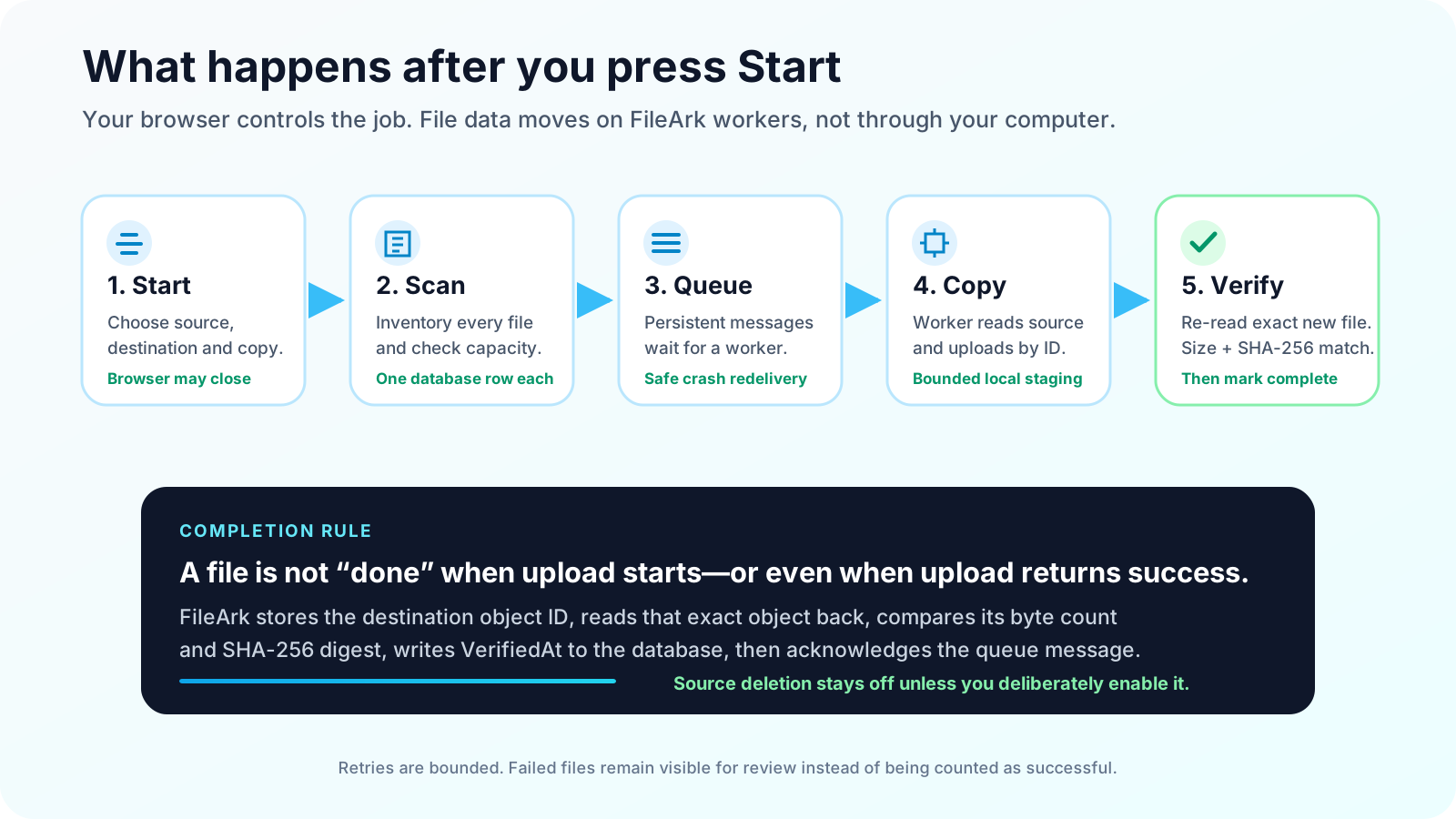
When Start is accepted, the API first writes a scan job to MongoDB and then publishes a persistent scan message to a durable RabbitMQ queue with publisher confirmation enabled. If publishing fails, the job is marked Failed and the API reports that it could not safely queue the scan.
The scanner authenticates both providers, inventories the selected source, checks the finite destination quota against discovered bytes, and upserts a database record for each source file. It publishes persistent migration messages and marks the scan complete only after those publishes succeed.
The migration worker uses manual acknowledgements and a prefetch count of one. A delivery remains unacknowledged while content is read, uploaded, re-read, verified, and persisted. A stopped connection or process can therefore return unfinished work to the queue.
A database row is a checklist item, not disposable bookkeeping
Every file record starts Pending, moves to InProgress during an attempt, and reaches Uploaded only after verification. Attempt count, last attempt time, error detail, destination object ID, both SHA-256 digests, verification method, and VerifiedAt remain attached to the record.
Completed records stay in the database as the progress and audit trail. “Crossing a file off” means a controlled state change, not deleting the evidence. Duplicate queue deliveries inspect that state and immediately acknowledge a record already marked Uploaded with VerifiedAt.
After three unsuccessful attempts, a persistent problem becomes Failed with a completion timestamp for the attempt cycle. This makes exceptions visible and prevents a poison message from spinning forever while the dashboard appears stuck.
Pending
  → InProgress (attempt recorded)
  → destination ID stored
  → destination size matches
  → exact destination object re-downloaded
  → source SHA-256 == destination SHA-256
  → Uploaded + VerifiedAt persisted
  → queue message acknowledged
Why a file may be delivered more than once
Reliable queues generally provide at-least-once delivery, not a magical exactly-once promise across a cloud API, a message broker, and a database. A crash can happen after OneDrive or Google Drive accepts an upload but before the worker writes completion.
FileArk handles that uncertainty with idempotent records and destination recovery. The worker first checks whether the record is already verified. If not, it can use the stored destination ID or search the expected destination path and exact size for the interrupted result before deciding to upload again.
Recovery candidates are then subjected to the same exact-object hash verification. Finding a familiar filename is not enough. The point is to convert an interrupted attempt back into evidence, not into an optimistic success.
Capacity is checked at the destination and on the worker
Before per-file jobs are published, the scanner totals non-negative source metadata sizes and compares the requirement with the destination’s reported remaining storage whenever the provider supplies a finite quota. An undersized destination fails the scan instead of feeding work into a known dead end.
The figure is a preflight, not a guarantee: account activity can consume space during a run, provider quota reports can lag, and exported cloud-native files may not have a conventional source size. Provider enforcement and per-file error handling remain active.
Your computer disk is not used for staging. On the migration worker, files above the memory threshold are placed in an isolated temporary directory only after the volume has room for the expected object plus a two-gigabyte reserve. Temporary content is removed in cleanup whether the attempt succeeds or throws.
Why destination ID plus SHA-256 matters
A filename is not a unique identity. The destination may already contain two files with the same visible name, or metadata listing may take time to settle. The upload response provides a provider object ID, and FileArk stores that ID before the final verification stage.
The worker computes SHA-256 across the source payload stream, uploads it, then opens the exact destination object by that ID and computes SHA-256 again. Equal size catches obvious truncation; equal cryptographic digest is the stronger byte-level check.
Only the transferred file representation is covered. A digest cannot validate sharing rules, comments, versions, labels, shortcuts, retention settings, or how an exported Google document renders for a user. Those remain acceptance tasks.
Source deletion is intentionally outside the normal success path
The safest default is copy-only, and FileArk’s deletion option is off unless you enable it. With deletion disabled, a verification failure cannot remove the original because deletion is never requested.
If you deliberately enable delete-after-move, the worker still waits for destination ID, size, and SHA-256 validation before calling the source provider’s delete operation. The stronger operational choice for irreplaceable or very large libraries is still to keep the option off and use a human-approved overlap period.
Migration answers “did a verified copy arrive?” Retention answers “when may the old copy be removed?” Treat them as separate decisions with separate evidence.
The same control model works in both directions
For OneDrive to Google Drive, the source payload is read from Microsoft Graph and the destination object is verified through Google Drive by its returned ID. For Google Drive to OneDrive, the source is downloaded or exported through Google Drive and the new OneDrive item is read back through Microsoft Graph.
The queue, database states, bounded attempts, capacity preflight, source digest, destination ID, destination digest, and acknowledgement order are direction-neutral. Provider adapters handle the different upload, folder, and content APIs.
The asymmetry is content semantics. Google-native documents need export, and both platforms have service-specific sharing and version behavior. Byte-verified file content should not be marketed as a complete clone of every collaboration feature.
Use a four-part acceptance plan
Reconcile the system record
Review completed, pending, in-progress, and failed counts. No failed item should be waved away because the overall percentage is high.
Sample by risk
Open the files that would hurt most to lose, plus large media, archives, old documents, non-English names, nested paths, and converted cloud-native files.
Validate destination behavior
Test access from real devices and users. Rebuild required sharing and confirm that Office or exported Google files open as expected.
Hold an overlap period
Keep the source available and stable while normal use exercises the destination. Make any cancellation or deletion decision later.
Frequently asked questions
Does FileArk use a queue for every file?
Yes. The scanner creates or reuses a database record per source file and publishes a persistent migration message. Workers pull those messages with manual acknowledgement.
When is a queue message acknowledged?
After the destination object ID, size, and SHA-256 have been verified and the Uploaded and VerifiedAt state has been persisted. Unfinished deliveries can be redelivered.
Are completed file records deleted from the database?
No. Completion is a state transition on the durable record. The row keeps destination identity, verification evidence, timing, and attempt information for progress and audit.
Can SHA-256 prove permissions and versions moved?
No. It proves the destination file bytes match the transferred source payload. Sharing, permissions, versions, comments, labels, shortcuts, and provider-native behavior need separate validation.
Is OneDrive to Google Drive verified the same way as the reverse?
The core rule is the same in both directions: source payload digest, destination object identity, destination size, exact-object re-download digest, persisted verification, then queue acknowledgement.
Official resources used for this guide
- Google Workspace Learning Center: switch from OneDrive to Google Drive
- Google Drive Help: storage and file behavior
- Microsoft Support: upload and save files to OneDrive
- RabbitMQ: consumer acknowledgements and publisher confirms
- RabbitMQ: data safety and reliability
- Google Drive API: resumable uploads
- Microsoft Graph: create an upload session